The root of the problem is that you’ve set the PDF logo as a PNG file type. The Zend Framework class that handles the PDF compilation doesn’t support de-interlaced images, which is a very common state for PNG file types.
Why allow PNG images, then?
The PNG file type in itself isn’t the problem, despite some of the solutions to this problem saying to convert to JPG. The problem is that the PNG isn’t interlaced.
There are two main differences between the two. Interlaced images increases the file size (bad). The benefit of de-interlaced images is that the pixels load in rows, rather than randomly (good). This is your typical image loading behavior; a slide-down effect.
This is compared to interlaced images where the pixels load randomly, which makes them blurry until fully loaded.
An Easy Fix
You can keep the PNG filetype by deselecting ‘Interlaced’ in PhotoShop and saving. If you don’t need the PNG file type, the easy solution would be to convert to JPG if you don’t have PhotoShop.
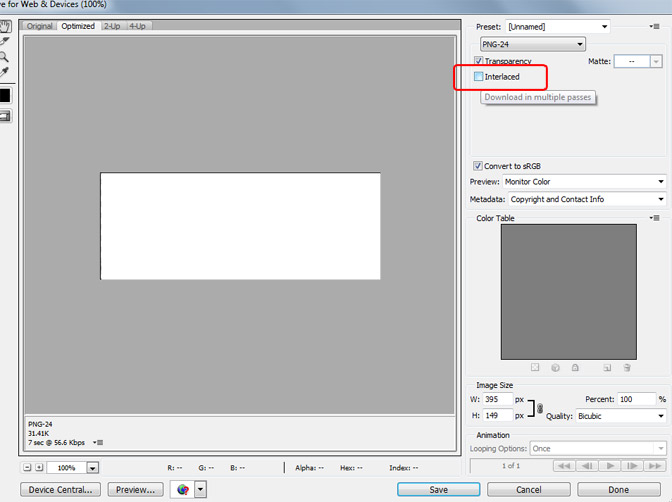
Finally, update the PDF logo inside Magento here:
Configuration → Sales → Sales → Invoice and Packing Slip Design

Hi Zachary.
Thank you soooo much!!! I’ve bookmarked your site as a go-to resource.
I’m a designer who is fairly new to Magento, and solving issues in such an immense file structure can be quite daunting at times. Who’d have thought the solution would be as simple as the logo file type (and Photoshop defaults to “interlaced” for PNGs)?
My next area of confusion: the USPS changes taking effect on 7/28/13. I now have 3 Magento CE 1.7 sites that will need to be updated, but don’t know what needs to be changed in what file(s). There’s nothing helpful in the Magento forums either. Are you familiar with this? If so, any help would be greatly appreciated.
Thanks again for helping me breathe a little re the printing issue! 🙂
Dorothy
Thank you so much for fixing my issue!!! After googling for a while this morning, you seem to be the only person who understands my magento issue. Much appreciated!!
Thanks for sharing this information. I have spent a couple of hours trying to find a solution that does not compromise security on the site. This solution is perfect!!
Convert the logo image in .jpeg format and it will work.